 listicle
Best Ways to Catalog Bourbon Collection in 2026
Table of Contents
- Why Cataloging Your Bourbon Collection Matters
- Quick Comparison: Top Cataloging Methods
- 1. Use a Dedicated Bourbon Tracking App
- 2. Build a Custom Bourbon Inventory Spreadsheet Template
- 3. Track Market Value with Price Comparison Tools
- 4. Organize Visual Collections with Notion
- 5. The Best Tools for Whiskey Collectors: What to Ignore
- Build a Better Bourbon Catalog: Proven Steps
- Frequently Asked Questions
Last Updated: September 6, 2026
A collection of 150 bottles is no longer a hobby; it is an asset that demands structure. Cataloging a bourbon collection properly protects your investment, informs your next purchase, and turns a wall of whiskey into a curated library. The best ways to catalog bourbon collection data range from free mobile apps to fully customized spreadsheets, and the right choice depends on how deep you want to go. At Bourbon Tracker™, we help collectors manage their bottles, log tasting notes, and build wishlists without needing a download, so we know the difference a solid system makes.
The problem most collectors face is not a lack of tools; it is a lack of a consistent workflow. Without a single source of truth, you end up with duplicate purchases, forgotten barrel picks, and no record of that exceptional cask strength bottle you killed last spring. Below, we break down five proven methods, what each one does well, and where it falls short, so you can pick a system that scales from your first bottle to your 200th.
Why Cataloging Your Bourbon Collection Matters
Most collectors start with a mental inventory, which works fine until it does not. The moment you own more than a few dozen bottles, memory fails: you cannot recall the exact batch number of that private selection, whether you already own a specific age statement release, or when you opened that dusty bottle of Kentucky heritage.
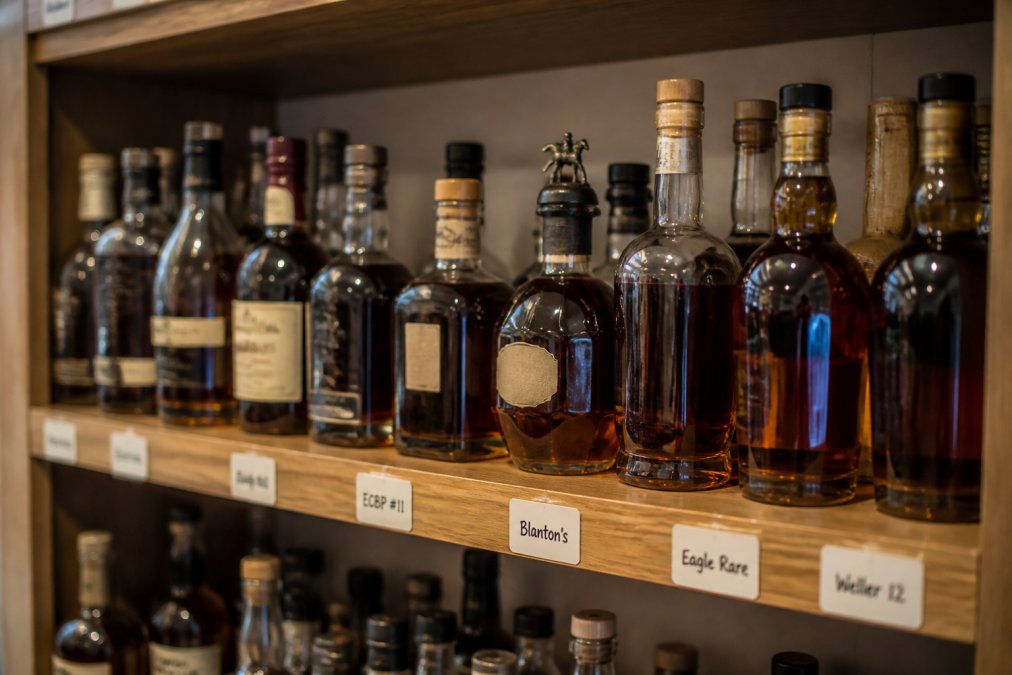
A proper catalog solves three specific problems. First, it prevents duplicate purchases, which matters when you are chasing rare releases and limited barrel picks. Second, it preserves your tasting history, so you can track how a bottle evolves after opening and remember which mash bills you actually enjoy. Third, it supports collection valuation, which becomes critical for insurance purposes if your collection grows into five figures or beyond.
The cost of skipping this step is tangible. Collectors who track their inventory report fewer impulse buys and more deliberate acquisitions, because they can see gaps in their collection rather than guessing (apa.org). A catalog also makes bottle rotation easier, ensuring you actually drink the bottles you bought to drink, not just the ones at the front of the shelf.
Quick Comparison: Top Cataloging Methods
Before we explore each option in depth, here is a snapshot of the five methods covered in this guide. Each approach trades off effort, cost, and features differently, so this table helps you find your starting point.
| Method | Best For | Key Strength | Main Tradeoff |
|---|---|---|---|
| Dedicated Tracking App | Most collectors | Speed and community features | Less control over data fields |
| Custom Spreadsheet | Data purists | Total control and portability | Manual entry on every bottle |
| Price Comparison Tools | Value trackers | Market data and valuation | Weak on tasting notes |
| Notion Database | Visual organizers | Aesthetic flexibility | Setup learning curve |
| Physical Labels + QR | Hybrid collectors | Instant shelf-to-app sync | Requires label printer |
The methods are not mutually exclusive. Many serious collectors pair a digital logbook with a physical labeling system, using QR codes to bridge the gap between the shelf and the spreadsheet. The key is to start with one method that fits your current habits, then layer in additional tools as your collection demands.
1. Use a Dedicated Bourbon Tracking App
A dedicated app is the fastest way to catalog bourbon collection data because it removes the friction of manual entry. You log a bottle in seconds, attach tasting notes, and move on. For collectors who want a centralized, no-download tool to manage their collection and wishlist on the go, this category is the clear winner.
Bourbon Tracker™ is a free digital platform designed specifically for managing bourbon and whiskey collections. It lets you log tasting notes, curate a personal wishlist, and receive AI-powered recommendations tailored to your palate. Because it is integrated with the broader bourbon community, you can see what other collectors are drinking and share your own reviews without juggling multiple platforms.
What sets Bourbon Tracker™ apart is the combination of utility and community. You are not just building a database; you are participating in a network of enthusiasts who can point you toward undiscovered bottles that match your stated preferences. The AI recommendations are based on your logged tasting history, not generic popularity lists, which means the suggestions get smarter the more you use the platform (acm.org).
Bourbon Tracker™: Built for Community and Discovery
For collectors who want more than a static list, Bourbon Tracker™ delivers a full ecosystem. The platform is free to use and requires no download, so you can access your inventory from any device with a browser. You can efficiently track your collection, keep organized tasting notes, and manage a personal wishlist, all in one place.
The community dimension is the differentiator. Instead of tracking bottles in isolation, you can see what other members with similar palates are enjoying, which is invaluable for discovering new whiskeys. The AI suggestions pull from your tasting history, so the recommendations reflect your specific preferences for proof, mash bill, and distillery style rather than pushing whatever is trending nationally.
BarrelBook: Snap a Photo, Done
BarrelBook takes a different approach: point your camera at a bottle and its AI recognizes it, pulling the details into your digital shelf automatically. You photograph the bottle, confirm the match, and the entry is complete.
The interface is clean and modern, built for visual thinkers who want to see their collection laid out as a digital shelf rather than a table of rows. The tradeoff is that the system relies on AI accuracy for bottle identification, which can stumble on store picks, private selections, or older releases with unusual labels. You will occasionally need to correct an entry manually, but for standard distillery releases, the photo-based entry is genuinely fast.
2. Build a Custom Bourbon Inventory Spreadsheet Template
Spreadsheets remain the backbone of serious collection management because they offer unlimited flexibility. A well-designed bourbon inventory spreadsheet template gives you complete control over your data fields, from bottle height and shelf location to tasting notes and secondary market value. No app can match that level of customization.
The downside is that you become the data entry department. Every new bottle requires a manual row, and every tasting note requires a manual update. For collectors who enjoy the ritual of maintaining their catalog, this is a feature, not a bug. For those who want to log a bottle in under ten seconds, a spreadsheet will feel tedious.
Excel vs. Google Sheets for Collectors
Microsoft Excel is the power user's choice (support.microsoft.com). It offers advanced sorting, filtering, and pivot table analysis that let you spot trends in your collection, such as which distilleries dominate your shelf or how your average proof has shifted over time. Data stays offline and fully owned by you, which appeals to privacy-conscious collectors. Excel requires a subscription, but the analytical depth justifies the cost for serious data users.
Google Sheets is the collaborative alternative. It is free, cloud-synced, and accessible from any device, which makes it easy to check your inventory while standing in a liquor store. Real-time collaboration means you can share your collection with a trusted friend or an insurance appraiser without sending files back and forth. The tradeoff is a lack of automated bottle data: no image recognition, no pre-filled distillery information. You build every entry from scratch.
3. Track Market Value with Price Comparison Tools
A catalog that tracks only what you paid misses half the picture. Price comparison platforms monitor market values across hundreds of retailers, giving you a realistic sense of what your collection is worth today. This matters for two reasons: insurance and trade decisions.
WhiskyFindr compares real-time prices across a large network of retailers, tracks market value fluctuations, and sends availability alerts when rare bottles appear in stock. For collectors focused on the financial side of the hobby, this tool is essential for collection valuation and for spotting fair pricing on secondary market purchases.
The limitation is that these platforms are not designed for personal tasting notes or cellar management. You would use WhiskyFindr to know what a bottle is worth, then log the purchase and your tasting impressions in your primary catalog. Pairing a price tracker with a dedicated tracking app gives you both the financial picture and the sensory record.
4. Organize Visual Collections with Notion
Notion offers a middle path between the rigidity of a spreadsheet and the simplicity of an app. It is a flexible workspace where you can build a custom database for your bourbon collection, with gallery views that display bottle photos alongside tasting notes, purchase dates, and personal ratings.
The visual payoff is significant. A Notion gallery view turns your collection into a beautiful digital library, which is satisfying for collectors who care about display aesthetics. You can attach photos, link to distillery pages, and use the web clipper to save bottle information from any site directly into your database.
The learning curve is real. Setting up the initial database structure takes time, and you will need to understand Notion's database views and relations to build something that works well. Once configured, however, the system is highly customizable and syncs across mobile and desktop. For collectors who enjoy building systems as much as collecting whiskey, Notion is a rewarding choice.
5. The Best Tools for Whiskey Collectors: What to Ignore
Not every tool deserves space in your workflow. The best tools for whiskey collectors share a few traits: they are fast to update, reliable over time, and they do not hold your data hostage. Tools that fail on any of these points are not worth the setup effort.
Skip any platform that requires you to export your data manually before you can leave. If there is no easy export option, you are building your catalog inside a walled garden. Also be wary of apps with no clear development roadmap; the whiskey tracking space has seen several promising tools disappear after a year or two, taking user data with them.
The tools worth your time share one more trait: they respect the difference between an open bottle and a sealed one. A good catalog tracks both, but it distinguishes between the bottle you are actively drinking and the one resting in storage. That distinction matters for bottle rotation and for accurate collection valuation, since an opened bottle is worth less than a sealed one.
Build a Better Bourbon Catalog: Proven Steps
A catalog is only as good as the habit behind it. The best system in the world fails if you do not log the bottle the day you bring it home. These steps will help you build a catalog that stays accurate and useful.
- Choose one primary method. Start with a dedicated tracking app if you want speed, or a spreadsheet if you want control. Do not run two systems in parallel; migrate later if needed.
- Log every bottle immediately. The moment a bottle enters your home, add it to your catalog. Include the distillery, age statement, proof, batch number, and what you paid.
- Photograph the label. A photo captures details you will not type, including the back label with tasting notes and the bottle's unique characteristics.
- Record tasting notes at first pour. Your initial impression is valuable. Log the nose, palate, and finish while the bottle is fresh, then update the entry as the bottle oxidizes.
- Assign a location. Track which shelf or cabinet each bottle occupies. This makes physical retrieval fast and helps you notice when a bottle is running low.
- Audit quarterly. Review your catalog against your physical shelf. This catches bottles you forgot to log and reminds you of what needs drinking before it oxidizes past its peak.
The habit of logging takes about thirty seconds per bottle once your system is in place. That small investment protects a collection that may represent years of hunting, hundreds of dollars, and countless good memories. Start with one method, commit to the routine, and your catalog will grow into the most useful tool in your whiskey arsenal.
Frequently Asked Questions
What is the best app for tracking bourbon collection?
The best app depends on your priorities. For a free, no-download option with AI recommendations and community features, Bourbon Tracker™ is an option. If you prefer photo-based entry, BarrelBook lets you snap a picture of a bottle to log it automatically. For those focused on market value, WhiskyFindr tracks pricing across retailers. Try a free tool first to see which workflow fits your cataloging style.
Is it better to use a spreadsheet or an app to catalog bourbon?
Spreadsheets like Excel or Google Sheets give you total control over columns, sorting, and data ownership, but require manual entry. Apps automate the process with databases, barcode scanning, and photo recognition, saving time. Many collectors start with a bourbon inventory spreadsheet template, then switch to an app as their collection grows past 50 bottles for easier maintenance and added features like tasting history.
How do I keep track of tasting notes for my whiskey bottles?
Log tasting notes immediately after your first pour, while the flavors are fresh. Record the date, proof, and your impressions of the nose, palate, and finish. Digital platforms like Bourbon Tracker™ let you store this tasting history alongside each bottle in your inventory, so you can compare notes over time or revisit a distillery's releases without relying on memory.
What should I include in a bourbon inventory spreadsheet template?
At minimum, your bourbon inventory spreadsheet template needs columns for distillery, name, age statement, proof, mash bill, bottle size, purchase date, and purchase price. Add fields for batch number, barrel picks, and a status column for sealed or opened bottles. A tasting notes column helps you track your tasting history. Sort by distillery or age to spot gaps in your collection.
Building a catalog is the first step; maintaining it is the ongoing discipline. Bourbon Tracker™ makes that discipline effortless with a free, no-download platform that combines collection tracking, tasting notes, AI-powered recommendations, and community discovery. Whether you are cataloging your first bottle or your 500th, Bourbon Tracker™ gives you a centralized home for your collection and a way to discover what to drink next. Track My Collection
Frequently Asked Questions
What is the best app for tracking bourbon collection?
The best app depends on your priorities. For a free, no-download option with AI recommendations and community features, Bourbon Tracker™ is an option. If you prefer photo-based entry, BarrelBook lets you snap a picture of a bottle to log it automatically. For those focused on market value, WhiskyFindr tracks pricing across retailers. Try a free tool first to see which workflow fits your cataloging style.
Is it better to use a spreadsheet or an app to catalog bourbon?
Spreadsheets like Excel or Google Sheets give you total control over columns, sorting, and data ownership, but require manual entry. Apps automate the process with databases, barcode scanning, and photo recognition, saving time. Many collectors start with a bourbon inventory spreadsheet template, then switch to an app as their collection grows past 50 bottles for easier maintenance and added features like tasting history.
How do I keep track of tasting notes for my whiskey bottles?
Log tasting notes immediately after your first pour, while the flavors are fresh. Record the date, proof, and your impressions of the nose, palate, and finish. Digital platforms like Bourbon Tracker™ let you store this tasting history alongside each bottle in your inventory, so you can compare notes over time or revisit a distillery's releases without relying on memory.
What should I include in a bourbon inventory spreadsheet template?
At minimum, your bourbon inventory spreadsheet template needs columns for distillery, name, age statement, proof, mash bill, bottle size, purchase date, and purchase price. Add fields for batch number, barrel picks, and a status column for sealed or opened bottles. A tasting notes column helps you track your tasting history. Sort by distillery or age to spot gaps in your collection.