 listicle
Best Free Whiskey Inventory Manager Online
Table of Contents
- What Makes a Free Whiskey Inventory Manager Worth Using
- Feature Comparison Table: Free Whiskey Inventory Managers
- Best Free Whiskey Inventory Manager Options
- Creating a Liquor Inventory Spreadsheet Template as a Backup
- Bar Inventory Management Best Practices for Home Collections
- How to Choose the Best Home Bar Inventory App for Your Needs
- Privacy, Data Ownership, and Free vs. Paid Considerations
- Conclusion
Last Updated: August 7, 2026
What Makes a Free Whiskey Inventory Manager Worth Using
A free whiskey inventory manager solves a problem most serious collectors face: tracking 50, 100, or 200+ bottles without unwieldy spreadsheets. The core value is tracking tasting notes, flagging bottles you're hunting for, and organizing your inventory so you know what you own without walking to the shelf. Many collectors discover they've bought duplicates or forgotten about bottles they already have, a digital system prevents that waste.
What separates a genuinely useful inventory manager from a throwaway app is how it handles details: Does it track proof and batch numbers? Can you log pour counts to monitor fill levels? Does it sync across devices? These features matter when managing anything beyond a casual handful of bottles. The best part about free options is that you get real functionality without commitment.
Feature Comparison Table: Free Whiskey Inventory Managers
| Tool | Mobile App | Collection Tracking | Tasting Notes | Community Features | Best For |
|---|---|---|---|---|---|
| Bourbon Tracker™ | Web-based (no download) | Yes, unlimited | Yes, organized | AI recommendations + community | Home collectors seeking AI-powered discovery |
| Whiskey Social | iOS & Android | Yes | Yes | Strong social feed | Collectors who want community engagement |
| Whiskey Collection Tracker | iOS & Android | Yes, detailed | Yes, with guide | Private only | Detail-focused collectors wanting privacy |
| Distilando App | iOS & Android | Yes | Yes, review-style | Limited | Multi-spirit enthusiasts (whiskey, rum, cognac) |
| BoozApp | iOS & Android | Yes | Basic | Minimal | Casual home bar managers |
Best Free Whiskey Inventory Manager Options
Bourbon Tracker™: AI-Powered Recommendations and Community
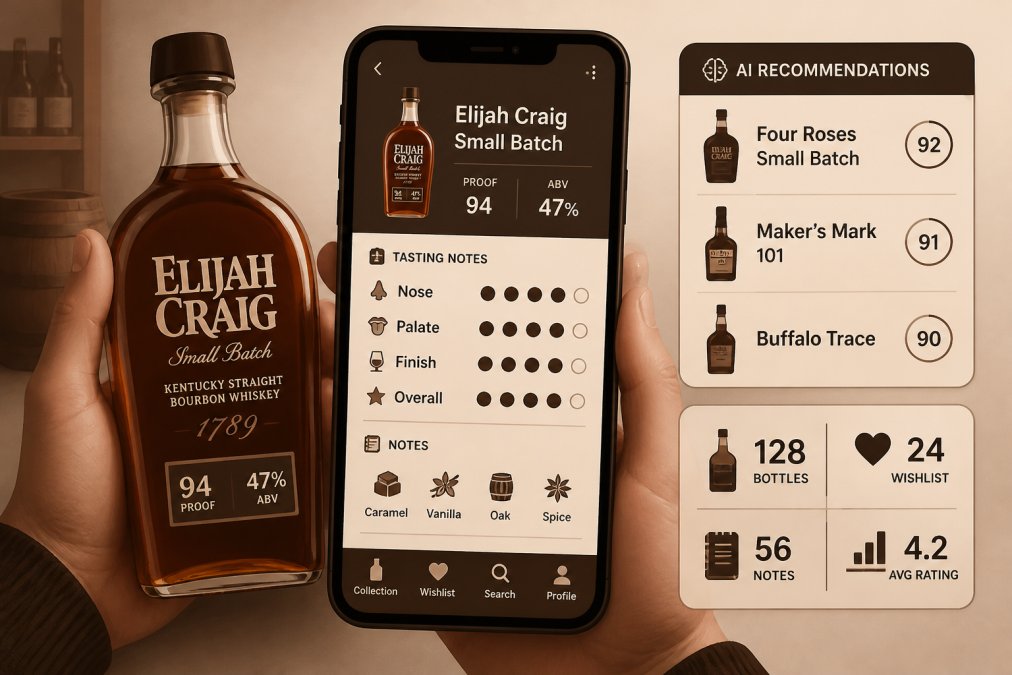
Bourbon Tracker™ treats your collection as the starting point for discovery, not just a catalog. The platform logs your bottles and tasting notes, then uses AI to surface recommendations tailored to your palate. If you've logged that you prefer high-rye bourbons with spice notes, the recommendation engine reflects that.
The no-download requirement matters. Your collection lives in the cloud, accessible from any browser on any device. Logging a new bottle takes seconds whether you're at home or at a liquor store. Bourbon Tracker™ is genuinely free forever with no hidden premium tier.
Whiskey Social: Collection Tracking with Social Discovery
Whiskey Social makes your collection a social asset. You log bottles, track pours, and write tasting notes, with value coming from seeing what other collectors are drinking and engaging with their reviews. The live social feed shows what's trending among serious enthusiasts and which bottles are generating discussion.
The database is comprehensive for bottle matching and distillery information. When you add a bottle, the app often auto-populates details like proof, age statement, and producer notes. The tradeoff: everything is social by default. For collectors who prefer privacy, this creates friction.
Best for: Home collectors who want to track their whiskey collection while staying connected to what other enthusiasts are discovering.
Whiskey Collection Tracker: Detailed Cataloging and Pour Tracking
This app is built for collectors who want precision. You can catalog bottles by proof, mash bill, distillery, age statement, and batch or barrel number. The pour tracking feature lets you log every pour and monitor fill levels, building a history of what you've tasted and when.
The app is private by default. Your collection stays yours with no social feed or algorithmic recommendations. The free version covers core features: cataloging, pour logging, and tasting notes.
Best for: Home whiskey collectors who want a private, detailed tracking system with pour history.
Distilando App: Multi-Spirit Support and Review Writing
Distilando handles whiskey, rum, and cognac. The app lets you digitize your collection, track prices paid, and write professional-style reviews. In-depth articles on over 300 brands provide context while you're building your collection.
The focus is on your inventory and notes, not the broader spirits community. It lacks community features or social discovery.
Best for: Whiskey, rum, and cognac enthusiasts who want to manage their collection and write detailed reviews.
BoozApp: Simple Home Bar Inventory
BoozApp takes the simplest approach: track what's in your home bar and discover new spirits. Adding a bottle is fast, and it supports many spirits beyond whiskey. The limitation is lack of depth for serious collectors, no detailed cataloging of proof, barrel number, or batch information.
Best for: Individuals looking for a simple app to manage their personal home bar without complexity.
Creating a Liquor Inventory Spreadsheet Template as a Backup
Many collectors maintain a liquor inventory spreadsheet template alongside their app as backup or for detailed analysis. A spreadsheet captures everything: bottle name, distillery, proof, age, purchase price, current market value, and tasting notes.
The advantage is total control. You design columns, set categories, and export data anytime. For collectors worried about platform longevity, a spreadsheet is insurance. The downside: spreadsheets don't sync across devices or offer community features. They're best used as a secondary system, your app stays current, and you export quarterly for backup.
A basic template includes: Bottle Name, Distillery, Type, Proof, Age, Purchase Date, Purchase Price, Current Market Value, Quantity, Tasting Notes, and Status. Color-coding by type or region makes scanning easier.
Bar Inventory Management Best Practices for Home Collections
Effective bar inventory management best practices start with consistency. Log new bottles immediately after purchase. Mark bottles in your system when you open them. Track pours if you're serious about understanding consumption patterns.
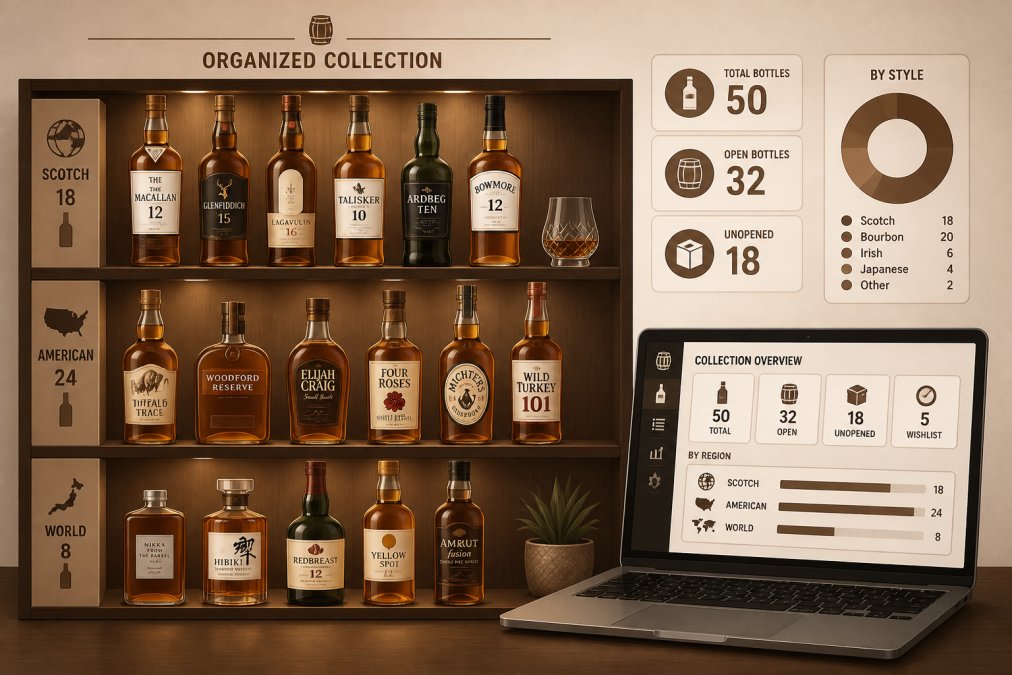
Organize your physical collection to match your digital inventory. If your app groups bottles by region, arrange your shelf the same way. This alignment makes visual audits quick and catches discrepancies.
Set a regular audit schedule, quarterly or semi-annually works for most collectors. Pull your digital inventory and walk your shelf. This catches data entry errors, confirms fill levels, and keeps your system honest.
Track market value if interested in understanding your collection's worth. This isn't about profit motive, it's about understanding the market and making informed decisions.
How to Choose the Best Home Bar Inventory App for Your Needs
Start by asking: How many bottles do you own? Do you want community features or privacy? How detailed do you want cataloging to be?
Under 50 bottles, BoozApp or a spreadsheet suffices. At 50-150 bottles, Whiskey Collection Tracker or Bourbon Tracker™ become valuable. Above 150 bottles, an app with unlimited capacity and cloud sync is essential.
Community preference matters. For recommendations and social discovery, choose Whiskey Social or Bourbon Tracker™. For privacy, choose Whiskey Collection Tracker.
Consider your device ecosystem. Most apps work on iOS and Android, but Bourbon Tracker™ offers web-based access with no download required. Test the app's interface before committing, spend a week adding 10-20 bottles and writing tasting notes.
Privacy, Data Ownership, and Free vs. Paid Considerations
Privacy concerns are legitimate when logging your collection online. Your wishlist and tasting notes represent your preferences and financial information. Understand how your data is handled before committing.
Most free apps use your collection data to improve recommendations or monetize anonymized insights. That's the trade-off for free access. If that bothers you, Whiskey Collection Tracker's private-by-default approach appeals.
Read the privacy policy before logging significant data. Look for: Does the app sell user data? Can you export your collection anytime? What happens to your data if the app shuts down?
The free vs. paid question often comes down to feature depth. Most free tiers handle basic cataloging, tasting notes, and collection organization. Paid tiers typically add advanced analytics or AI recommendations. For many collectors, the free tier is sufficient indefinitely.
Bourbon Tracker™ is free forever with no premium tier, removing uncertainty. Consider platform longevity, apps shut down, and your data can vanish if you haven't exported it. Collectors with 100+ bottles should export data quarterly as backup, regardless of which app they use.
Choosing a free whiskey inventory manager is about matching the tool to your collection size and workflow. For most home collectors, Bourbon Tracker™ delivers everything you need: unlimited bottle tracking, AI-powered recommendations, community features, and genuine free access forever. If you prioritize privacy over discovery, Whiskey Collection Tracker offers detailed cataloging without the social layer. For casual home bar managers, BoozApp keeps things simple. The key is consistency, whichever platform you choose, commit to regular updates and quarterly audits. Start tracking with Bourbon Tracker™ and discover how much easier managing your bottles becomes when you have a system built for what you actually collect.
Frequently Asked Questions
Is there a truly free whiskey inventory manager that won't charge me later?
Yes. Several free whiskey inventory managers are genuinely free forever with no hidden premium tiers for core features. Bourbon Tracker, Whiskey Social, Distilando, and BoozApp all offer completely free tracking, tasting notes, and wishlist management without requiring payment. Always check the app's pricing page or terms to confirm which features remain free and which may require a paid upgrade.
Can a free whiskey inventory manager handle a large collection of 150+ bottles?
Most free whiskey inventory managers handle large collections well. Apps like Whiskey Collection Tracker and Bourbon Tracker are built to catalog extensive spirits collections without performance issues. The key is choosing an app designed for detailed bottle tracking rather than simple lists. Test the app with 20-30 bottles first to confirm it feels responsive and organized before logging your entire collection.
What's the difference between using a liquor inventory spreadsheet template and an app?
A spreadsheet template gives you flexibility and offline control but requires manual updates and offers no automated features. A free whiskey inventory manager app automates bottle tracking, syncs across devices via cloud, provides barcode scanning, generates tasting history, and often includes community features. For serious collectors, an app saves time and prevents inventory gaps that spreadsheets often miss.
How private is my collection data in a free whiskey inventory manager?
Privacy varies by app. Whiskey Collection Tracker stores data locally on your device with no social feed, keeping your collection completely private. Apps like Whiskey Social include optional social features but let you control visibility. Always review the app's privacy policy before logging sensitive details about your collection value or wishlist. Bourbon Tracker integrates community features while maintaining your data ownership.
Which free home bar inventory app works best for tracking both whiskey and other spirits?
Distilando App and BoozApp both support multiple spirit types including whiskey, rum, cognac, gin, and vodka, making them ideal for diverse home bars. Bourbon Tracker focuses on bourbon and whiskey but excels in those categories. If your collection spans many spirit types, Distilando's multi-spirit database and BoozApp's broad spirit support make them better choices than whiskey-specific apps.
This article was written using GrandRanker